![worth logo Dark.png 16-31-37-785 1.png]](https://support.worthscore.com/hs-fs/hubfs/worth%20logo%20Dark.png%2016-31-37-785%201.png?height=40&name=worth%20logo%20Dark.png%2016-31-37-785%201.png)
Introduction
Custom fields allow financial institutions to add questions to the Worth onboarding application, beyond Worth's standard fields. They are configured per customer account and appear during the application flow to capture business-specific data the institution needs, whether for internal underwriting criteria, compliance requirements, or additional context not covered by standard KYB verification. Custom fields supplement Worth's standard verification and onboarding process and do not replace any of the platform's existing verification checks.
Where Custom Fields Appear
Custom fields are available in the following areas of the Worth platform:
- API – Custom fields can be provided when sending an invitation or creating a business and can also be accessed via the Worth API. Values are validated against the configuration defined in the customer's custom field template. Refer to the API Documentation for available endpoints, authentication requirements, and request/response examples. API DOC
- Application Flow – During onboarding, custom fields are added as the final step in the application process.
- E-Sign – When custom fields are included in the application flow, their responses can be mapped directly to the e-sign document.
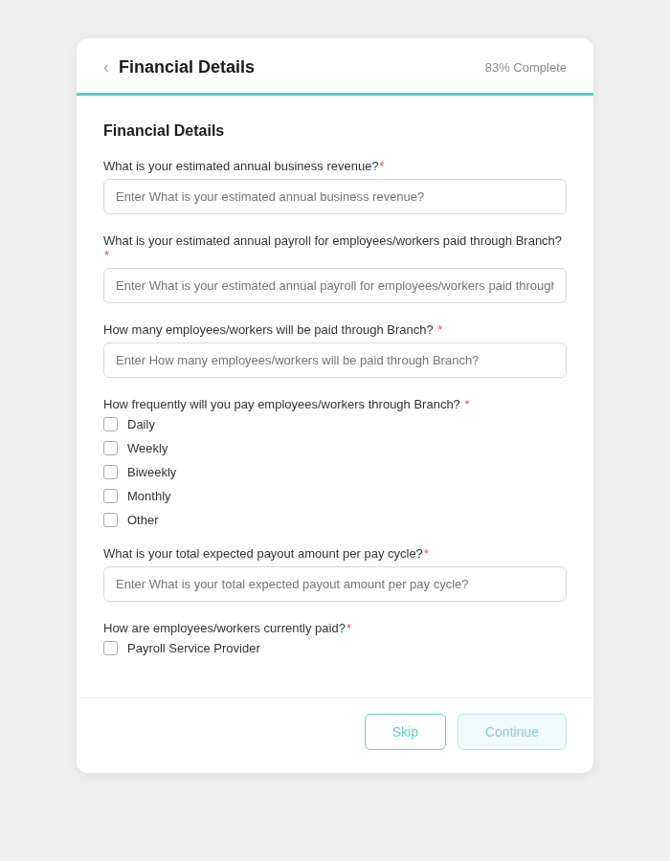
Example : Custom Fields displayed in an applicant-facing onboarding form.
Field Types That Are Supported:
- Text
- Full Text
- Dropdown
- Integer
- Upload
- Phone Number
- Boolean (Yes/No)
- Alphanumeric
** Additional validation rules, such as minimum/maximum length, file type restrictions, and file size limits, can also be configured as part of the custom field setup.
Required vs. Optional Fields
Custom fields can be configured as either required or optional. Required fields must be completed before the applicant can continue through the onboarding flow. Desired validation requirements should be specified in the Custom Fields template provided by Worth.
How Setup Works
Custom field configuration is handled by the Worth team. The process is as follows:
- The CSM will provide a Custom Fields template containing field definitions, requirements, examples, and guidance on the information needed for each custom field.
- Using the template, the client provides their custom field requirements, including the field name, a brief description or instruction for the applicant, and the step in the application where the field should appear.
- Once the completed template is returned, a Worth Administrator uploads and configures the custom fields on the account.
- Worth tests the onboarding flow to confirm the custom fields display and function as expected.
- Once validation is complete, the configuration is deployed to production..
Configuration & Management
Custom fields settings are managed at the account level:
- One configuration file per account.
- Custom field setup is managed by the Worth team. Contact the CSM or implementation contact to create or update fields.
- Changes require a file update. To modify existing fields, Worth deletes the current file and uploads a new one.
Frequently Asked Questions
- Why don't I see custom fields in Case Management or the 360 Report?
- Custom fields are currently only available within the case record under the Custom Fields tab (visible only when responses exist) and are not displayed in the Worth 360 Report.
- Can I configure custom fields myself?
- Not today. Custom field setup is handled by the Worth team. Contact the CSM with the fields to add or change.
- How long does setup take?
- Custom field configurations are completed within 5 business days after final requirements are received. More complex configurations involving conditional logic or extensive testing may require additional time. Your CSM can provide a project-specific estimate.
- Can I have different custom fields for different application types?
- Each account supports one configuration file. If different field sets are needed for different products or application types, contact the CSM to discuss options.
- What happens if I need to remove a custom field?
- Removing a field requires uploading a new configuration file without that field. Worth will delete the existing file and upload the updated version. All previously collected data for that field remains accessible in the API.