![worth logo Dark.png 16-31-37-785 1.png]](https://support.worthscore.com/hs-fs/hubfs/worth%20logo%20Dark.png%2016-31-37-785%201.png?height=40&name=worth%20logo%20Dark.png%2016-31-37-785%201.png)
Introduction
As Worth reviews a business and its owners, each individual check (such as KYB, KYC, or Banking) returns its own verification status describing the outcome of that check. The table below explains what each verification status means and whether any action may be required.The table below explains what each status means and what action to take, if any.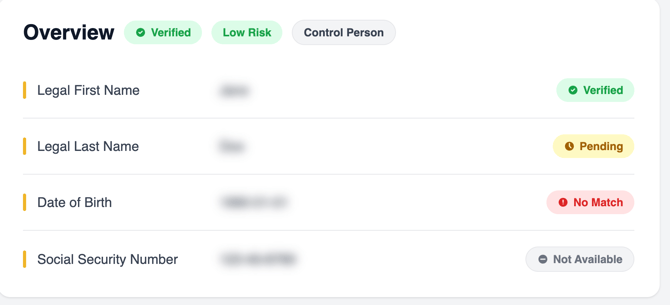
Case Management displaying multiple verification statuses (Verified, Pending, No Match, and Not Available)
Because each verification is evaluated independently, it's normal for different verifications within the same case to display different statuses. Review each verification individually rather than assuming one status applies to the entire case.
Verification Statuses
|
Status |
What It Means |
Recommended Action |
|
Verified |
The verification completed successfully, and the submitted information was sufficiently matched against available data sources. |
No action is required. |
|
Pending |
The verification is still processing. |
Wait for processing to finish. If the status has not been updated after 24 hours, contact Worth Support for assistance. |
|
No Match |
The information provided could not be matched against available data sources. |
Depending on the verification, you may need to review the applicant’s submitted information in the verification report, correct any discrepancies, or request additional supporting documentation. |
|
Not Available |
The requested verification could not be performed, either because the necessary data was unavailable or because the verification did not apply to this case. |
This does not necessarily indicate a problem with the application. Review the 360 Report or the relevant tab in Case Management for additional context. |
If you are unsure why a verification received a particular status, open the individual verification report or 360 Report to review the supporting details before taking action.
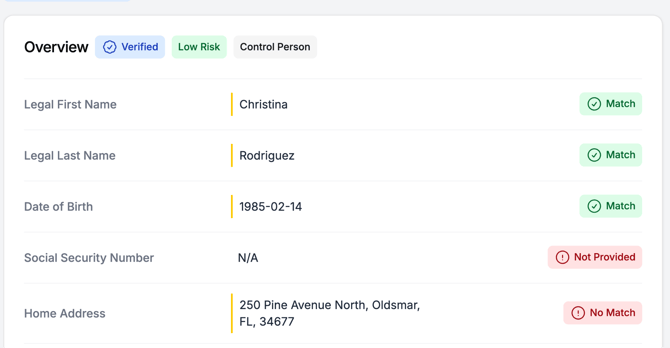
Individual verification report showing the overall verification status and supporting match details.
Note: Not Available is different from No Match. Not Available means the data could not be retrieved or the verification did not apply. No Match means data was retrieved but did not match the submitted information.
Why Is My Worth Score Unavailable?
Learn about common reasons a Worth Score may not generate and how to troubleshoot them.
Additional Information- Decisioning rules determine how verification results may affect an application.
- Some verifications are informational only and may not impact the overall case outcome.
Important: A verification status reflects the outcome of a single verification only. It does not represent the overall application or case status.
When to Contact Support
Reach out to Worth Support if any of the following apply:
- A verification status appears incorrect despite accurate submitted information.
- A verification has remained in Pending status for over 24 hours.
- You believe a No Match result may be linked to a data or system issue rather than the submitted information.
If you still have questions after reviewing the verification report and 360 Report, contact Worth Support for assistance.
Frequently Asked Questions
-
Why does one verification show Verified while another shows Not Available
-
Because each verification relies on different data sources and evaluation criteria, it's possible for one verification to be Verified while another is Not Available within the same case.
-
-
Does No Match mean fraud?
-
No. A No Match status only means the submitted information could not be matched with available records. It does not automatically indicate fraudulent activity.
If a specific verification result still doesn't make sense after reviewing this article, Contact Worth Support.
-