![worth logo Dark.png 16-31-37-785 1.png]](https://support.worthscore.com/hs-fs/hubfs/worth%20logo%20Dark.png%2016-31-37-785%201.png?height=40&name=worth%20logo%20Dark.png%2016-31-37-785%201.png)
Introduction
Know Your Customer (KYC) and Identity Verification (IDV) are both used to verify applicants during onboarding, but they serve different purposes.
IDV confirms that a person is who they claim to be. KYC is the broader process of verifying identity, assessing risk, and meeting compliance requirements.
In Worth, you’ll find both results in the KYC tab within Case Management, where they are tracked separately.
The sections below explain what each process verifies, how they work together, and what you'll see in Worth.
Identity Verification (IDV) confirms that a person is who they claim to be. It typically includes:
- Verifying a government-issued photo ID, such as a driver’s license or passport
- Comparing a selfie to the photo on the ID to confirm a match. This step can include a liveness check, which confirms that a real person is present at the time of capture rather than a photo or a recording.
- Confirming that the ID document is authentic and has not been tampered with or digitally altered
The goal of IDV is to answer one question: “Is this person who they claim to be?”
The walkthrough below shows the beginning of the IDV experience from the applicant’s perspective, starting with selecting an identity document. Reviewing it before you go live helps you understand what applicants see when beginning the identity verification process
IDV Walkthrough
A note on devices: IDV’s document and selfie capture steps are designed for a phone camera rather than a desktop webcam. Sometimes the person filling out the application is not the person who needs to verify their identity, such as when someone completes the form on behalf of a business owner. In that case, a co-applicant can be invited to complete IDV separately on their own device. The co-applicant can provide their required information, but only the person who received the original invitation can submit the completed application.
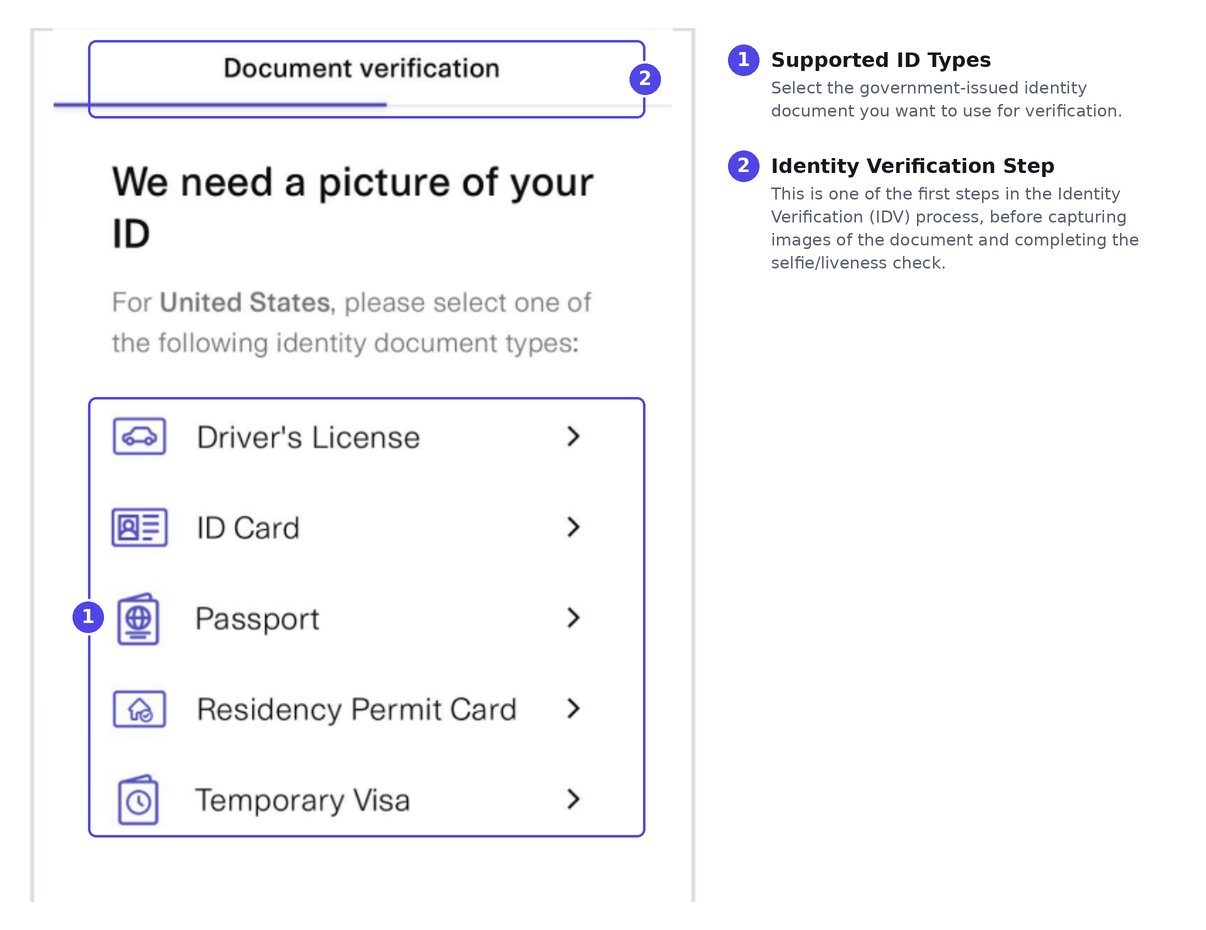
Figure 1. Selecting an Identity Document for IDV. Applicants select a supported government-issued identity document before capturing images to complete Identity Verification (IDV).
What Is Know Your Customer (KYC)?Know Your Customer (KYC) is the broader process used to verify the individuals behind a business application and assess the risk they present. In Worth, this starts with the ownership details collected for each required individual:
- Full legal name
- Date of birth
- Social Security Number, when required by your organization’s configuration
- Home address
- Email and phone number
From there, KYC also includes:
- Identity Verification (IDV)
- Screening against sanctions and watchlists, such as the U.S. Office of Foreign Assets Control (OFAC) restricted-party list
- A fraud risk assessment
The goal of KYC is to answer a broader question: “Who is this customer, and what level of risk do they present?”
Who this applies to: Every business needs at least one Control Person, the individual authorized to sign on the business’s behalf. A Control Person does not need an ownership stake to go through KYC and IDV. Separately, any Beneficial Owner holding 25% or more of the business must also be verified.
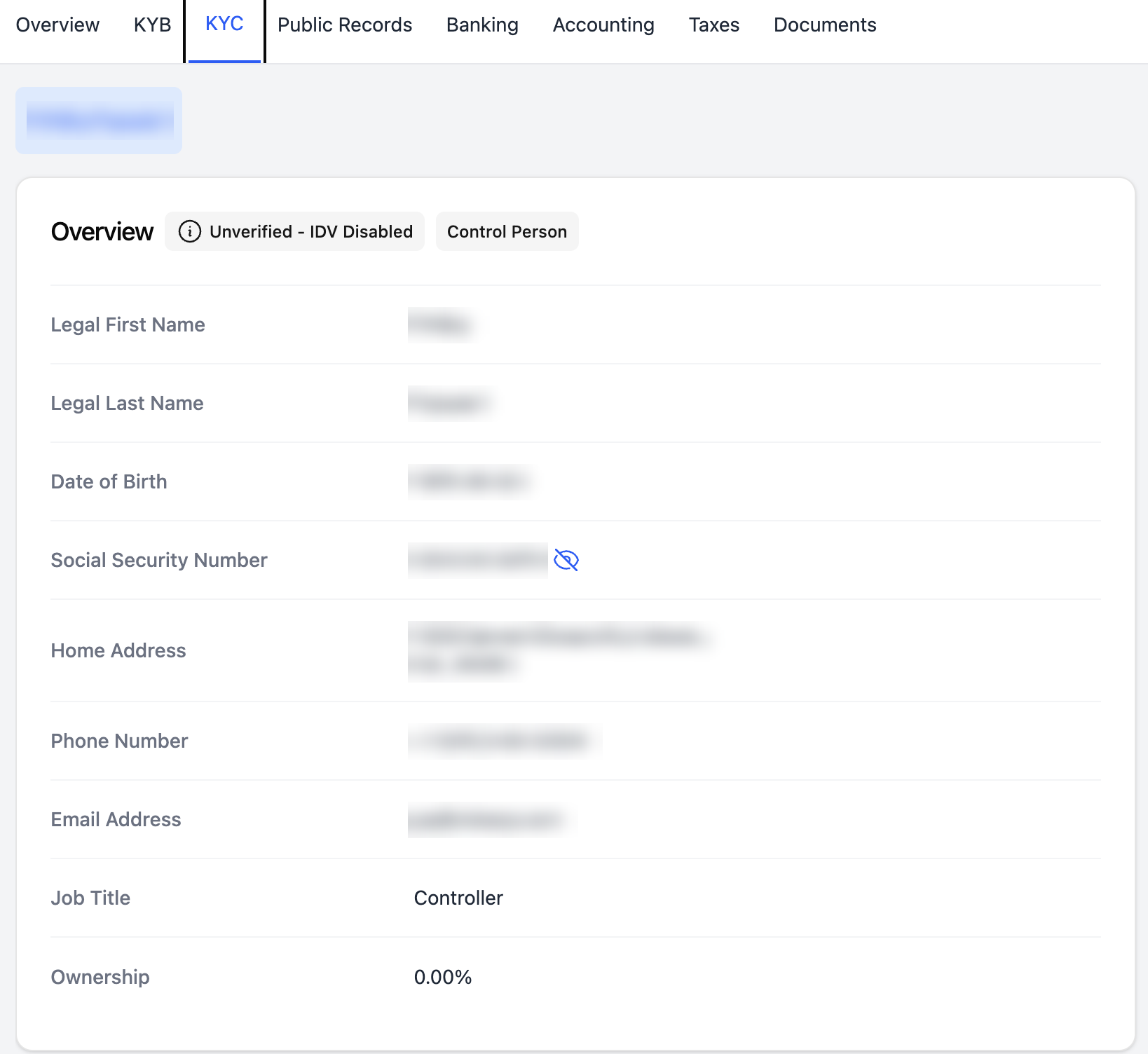
Figure 2. KYC Tab Overview. The Overview section of the KYC tab displays the individual’s identity and contact information, including name, date of birth, address, phone number, and ownership details.
How KYC and IDV Work TogetherIdentity Verification is one part of the Know Your Customer process. IDV establishes that an applicant is who they claim to be, and KYC builds on that result with additional compliance and risk assessments, such as watchlist screening and fraud risk evaluation.
Because the two are tracked separately, they may not update at the same time. For example, KYC may be marked as Verified while IDV is still Pending if the applicant has not yet completed identity verification. This is expected behavior and does not indicate an issue with the application.
You may also see other statuses depending on your organization’s configuration and where the applicant is in the process. For example, an individual who is not required to complete identity verification may appear as Unverified with IDV disabled.
KYC vs. IDV Comparison Table|
Category |
Identity Verification (IDV) |
Know Your Customer (KYC) |
|---|---|---|
|
Primary Focus |
Verifying a person’s identity |
Verifying identity and assessing customer risk |
|
Purpose |
Confirm that someone is who they claim to be |
Meet regulatory and compliance requirements while evaluating customer risk |
|
Typical Use Cases |
Onboarding, ownership verification, identity confirmation |
Business onboarding and regulatory compliance for financial and other regulated industries |
|
Scope |
Identity verification only (document plus selfie and liveness check) |
Identity data collection, plus watchlist screening and fraud risk assessment |
|
Who Completes It |
The Control Person and any Beneficial Owner with 25% or more ownership |
The same individuals. IDV is part of their overall KYC record |
|
Where It Lives in Worth |
IDV badge on the case’s KYC tab |
Case Management > KYC tab (Overview, Email Report, Fraud Report) |
Viewing Results in Worth
Where to find it: Open a case in Case Management and select the KYC tab. This tab brings together:
- Overview: a summary of the applicant or Control Person, including the IDV badge
- Email Report: results from email verification, including deliverability, breach history, and domain checks
- Fraud Report: Synthetic and Stolen Identity Risk scores, generated once a full IDV has been run
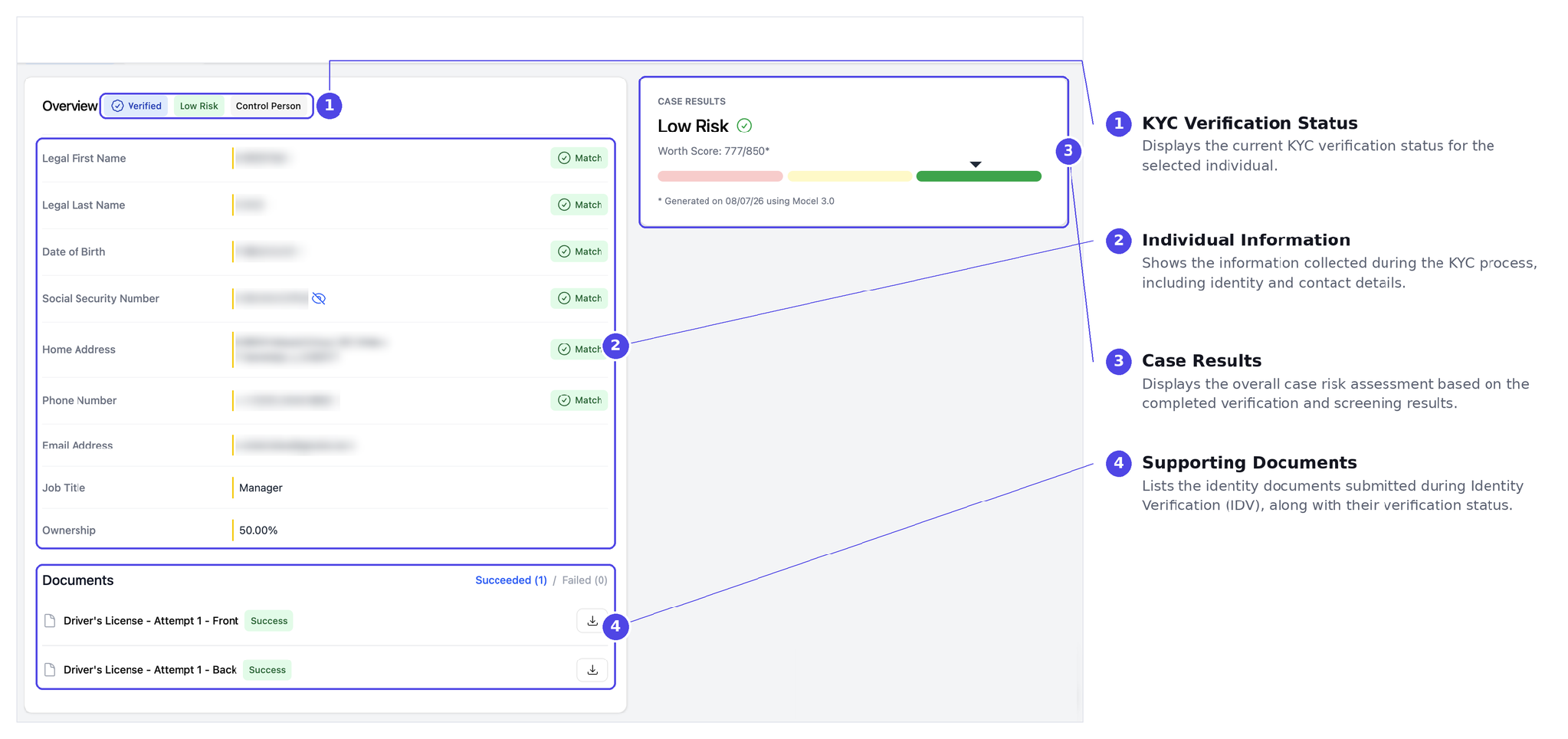
Figure 3. KYC Overview in Case Management. The KYC tab displays the information collected during the KYC process, the individual’s verification status, submitted identity documents, and the overall case results.
Fraud Report risk scores: Both scores range from 0 to 100 and are grouped into Low, Moderate, or High risk.
|
Score Type |
Low |
Moderate |
High |
|---|---|---|---|
|
Synthetic Identity Risk |
Below 60 |
60–69 |
70+ |
|
Stolen Identity Risk |
Below 80 |
80–89 |
90+ |
Synthetic Identity Risk reflects the likelihood that an identity was fabricated using a mix of real and false information. Stolen Identity Risk reflects the likelihood that real information belongs to someone else and is being used without their knowledge. These are probability scores rather than a final determination, so review decisions should align with your organization’s own risk policies.
Supported ID documents: IDV supports multiple government-issued identity documents, including driver's licenses, state and national ID cards, passports, residency permit cards, and temporary visas. Supported documents vary by country.
If Verification Doesn't Pass
A failed or incomplete identity verification automatically routes the case for manual review, along with other review triggers such as an unverified TIN or a mismatched address.
A manual review does not mean something is wrong with the application. It simply means the case requires additional review before a decision can be made.
Passing KYC checks is also one of the criteria used for Worth Score auto-approval. As a result, an incomplete or unsuccessful KYC or IDV verification may cause a case to be routed for manual review instead of being automatically approved.
Frequently Asked Questions
Can KYC and IDV have different statuses?
Yes. KYC and IDV are tracked independently, so they may not complete at the same time. For example, KYC may show as Verified while IDV remains Pending until the applicant completes the identity verification process.
What happens if KYC or IDV doesn’t pass?
If KYC or IDV cannot be successfully completed, the application is routed for manual review. This allows your team to review the results before a final decision is made.
Does every business owner need to complete KYC and IDV?
Not every owner. The Control Person must always complete KYC and IDV. In addition, any Beneficial Owner with 25% or more ownership is also required to complete verification.
Is a Social Security Number always required?
No. SSN requirements are configurable, allowing organizations to tailor identity verification to their specific onboarding requirements. In some cases, such as municipal applicants, the individual completing the application may not be required to provide an SSN. Worth supports a Bypass SSN option for eligible use cases.
Someone else is completing the application on behalf of the business owner. How do they complete IDV?
If someone other than the business owner is completing the application, a co-applicant can be invited to complete identity verification on their own device. Only the individual who received the original application invitation can submit the completed application.
Why wasn’t a known fraudulent identity flagged during IDV?
Fraud and risk scores are based on the information available at the time of verification. If an identity has not previously been associated with fraudulent activity, it may not generate a high-risk score. A low fraud score does not guarantee that fraud is impossible; it reflects the available data at the time the verification is performed.