![worth logo Dark.png 16-31-37-785 1.png]](https://support.worthscore.com/hs-fs/hubfs/worth%20logo%20Dark.png%2016-31-37-785%201.png?height=40&name=worth%20logo%20Dark.png%2016-31-37-785%201.png)
Overview
Worth Risk Monitoring continuously monitors onboarded businesses for negative events, such as bankruptcies, declines in Worth Score, or new adverse media. When a material change is detected, a Risk Alert is generated to enable timely action and reduce potential losses.
Risk Monitoring may also appear as “Predictive Monitoring” on a Worth order form; both refer to the same feature.
What Risk Monitoring Does
During onboarding, Worth performs a full set of verifications and assigns a Worth Score. Risk Monitoring extends this process by tracking businesses after approval.
When a change significantly impacts a business’s risk profile, a Risk Alert is created in the Case Management queue. For API-integrated accounts, alerts can also be delivered via webhooks in real time.
This continuous monitoring gives underwriters the ability to step in earlier, such as contacting the merchant, requesting updated financials, adjusting credit terms, or offboarding the account.
Risk Alert Triggers
A Risk Alert is generated when any of the following events occur:
- New bankruptcy, lien, or judgment filed against the business
- New adverse media referencing the business, its control person, or beneficial owners
- A significant decline in Worth Score (i.e., 50+ points from onboarding), indicating a shift to a higher risk tier (i.e., low to medium or medium to high).
- VantageScore decline for a control person or beneficial owner exceeding the configured percentage threshold
Underlying data is refreshed approximately every 30 days, and alerts reflect changes since the previous refresh.
Alert Severities
Each alert is assigned a severity level to support prioritization:
- High Severity
- New bankruptcy, lien, or judgment
- Significant Worth Score decline exceeding configured thresholds
- Movement from medium to high risk tier
- Medium Severity
- New adverse media
- VantageScore decline
- Movement from low to medium risk tier
Severity levels are displayed in the Case Management interface and included in webhook payloads.
Alert Delivery Channels
- Case Management
- A Risk Case is created in the “Cases” tab when an alert is triggered. The case includes details of the change, severity level, and refreshed data.
- API / Webhooks
- Alerts can be delivered to external systems in real time via configured webhooks.
- Email Notifications
- Case assignees receive email notifications when a Risk Case is assigned, if enabled in user settings.
Configuration
All Risk Monitoring settings are located in:
Settings → Scoring & Alerts → Risk Alerts
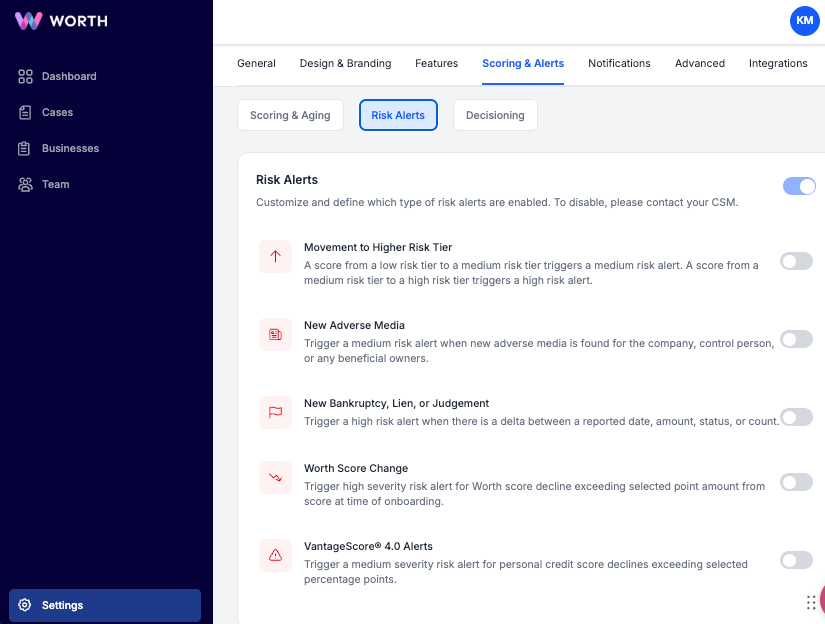
Configuration options include:
- Enable or disable Risk Alerts at the account level
- Define Worth Score ranges for low, medium, and high risk tiers
- Configure individual alert triggers:
- Movement to a higher risk tier (on/off)
- New adverse media (on/off, medium severity)
- New bankruptcy, lien, or judgment (on/off, high severity)
- Worth Score change alerts (on/off, with configurable point-drop threshold)
- VantageScore 4.0 alerts (on/off, with configurable percentage threshold)
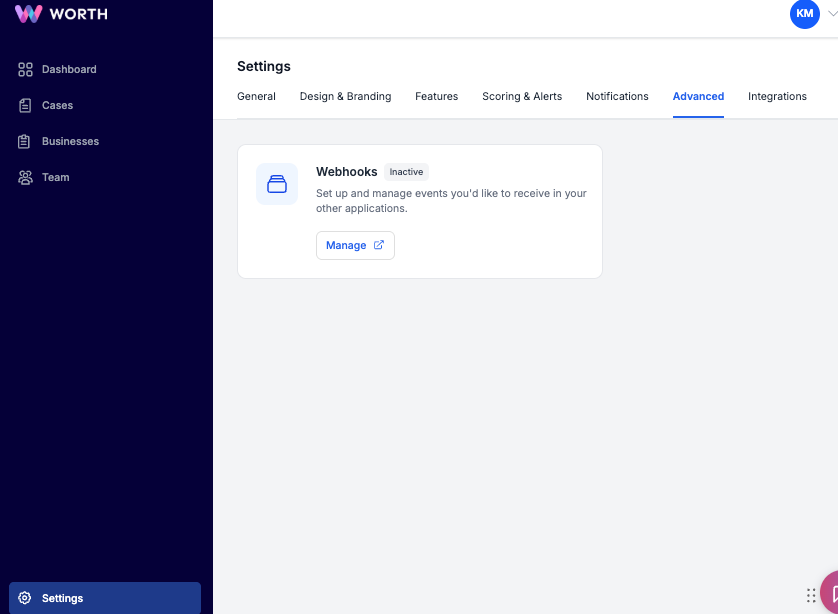
Optional webhook delivery can be configured under:
Settings → Advanced → Webhooks
All configuration changes apply immediately to businesses currently enrolled in monitoring.
Managing Monitoring for Individual Businesses
Risk Monitoring is enabled by default for all onboarded businesses. Monitoring can be disabled for specific businesses, such as low-risk segments, test accounts, or offboarded merchants.
To disable monitoring:
- Navigate to the Businesses tab in Customer Admin
- Toggle Risk Monitoring off on the Business Details page
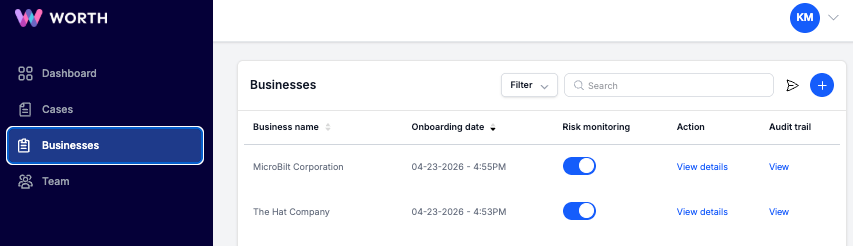
Monitoring can be re-enabled at any time. Disabling monitoring stops future data refreshes and alerts but does not remove historical alerts.
To disable Risk Monitoring across an entire account, coordination with a Customer Success Manager is required.
Frequently Asked Questions
- How often is information refreshed?
Data is refreshed approximately every 30 days on a rolling basis per business. - Can specific businesses be included or excluded from monitoring?
Yes. Monitoring is enabled by default and can be toggled on or off at the individual business level. - Is monitoring required for initial adverse media and public filings checks?
No. These checks occur during onboarding. Risk Monitoring provides continuous post-onboarding coverage. - Can alert thresholds be updated?
Yes. Worth Score and VantageScore thresholds can be adjusted at any time. Updates apply to future alerts only. - Does monitoring include business owners?
Yes. Monitoring covers the business, control persons, and beneficial owners. - How are false positives handled?
Risk Cases can be reviewed and dismissed within Case Management. Dismissals are recorded in the audit trail. - How are alerts stopped for offboarded businesses?
Monitoring can be disabled from the Business Details page for the relevant business. - Is there an additional cost for monitoring?
Risk Monitoring (also referred to as Predictive Monitoring) is a contracted product. Pricing details depend on the agreement. - Where to get support?
For configuration or product questions, contact a Customer Success Manager or use in-platform chat.