![worth logo Dark.png 16-31-37-785 1.png]](https://support.worthscore.com/hs-fs/hubfs/worth%20logo%20Dark.png%2016-31-37-785%201.png?height=40&name=worth%20logo%20Dark.png%2016-31-37-785%201.png)
Introduction
KYB verification is a critical part of ensuring regulatory compliance and mitigating risk. The process begins after collecting key business information including Tax Identification Number (TIN), company name, and business address.
Business Name and Tax ID Verification
Existence Check: The submitted company name and TIN are cross-referenced against federal and state business registries to confirm that the business exists and is legally registered.
Fuzzy Matching: The system uses fuzzy matching techniques accounting for minor spelling differences, abbreviations or alternate formatting, and common typographical errors.
Verification Outcome: The business qualifies as verified when the TIN and company name match registry records, and the registration is active with the relevant state authority. For businesses registered in Delaware or New Jersey, active status can’t always be confirmed this way. See “Why You May See ‘Status Not Available’ for SOS Filings” below.
Additional Secretary of State (SOS) Documentation- Legal Entity Name verification
- Registration Date
- Entity Type classification (LLC, Corporation, etc.)
- State of Registration
- Corporate Officers listing
- Active Status confirmation
- Articles of Incorporation access
For most businesses, Worth can automatically confirm an active Secretary of State (SOS) filing. For businesses registered in Delaware or New Jersey, the badge beside Secretary of State Filings may instead display “Status Not Available,” and the Filing Status field may show “Unable to Verify.”
The badge beside Secretary of State Filings shows the overall verification result for the Secretary of State filing, while the Filing Status field shows the status returned for the filing.
Delaware and New Jersey don’t publish active filing status in a form that can be retrieved automatically, so Worth can’t confirm it the way it can for other states. These statuses do not necessarily mean the business is inactive.
If additional verification is needed, follow your organization’s established review procedures. If this status appears for a business registered in a state other than Delaware or New Jersey, contact Worth Support at Support@joinworth.com, as this may indicate an issue. 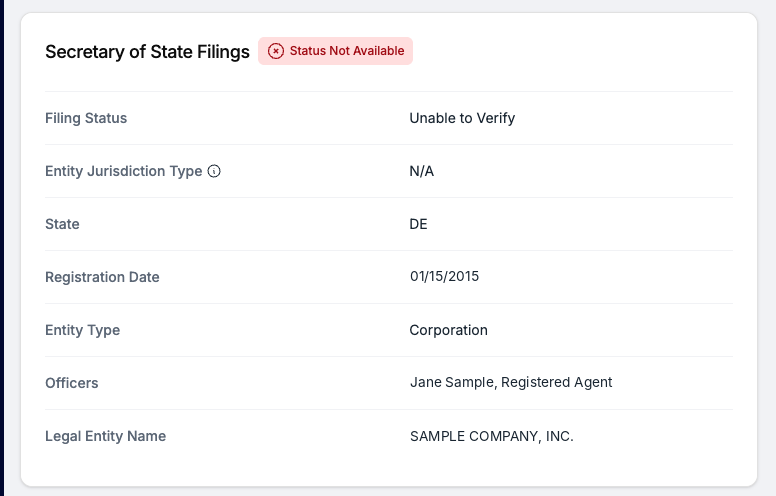
Figure 1: Secretary of State Filings in the KYB Tab for a Delaware filing (illustrative sample)
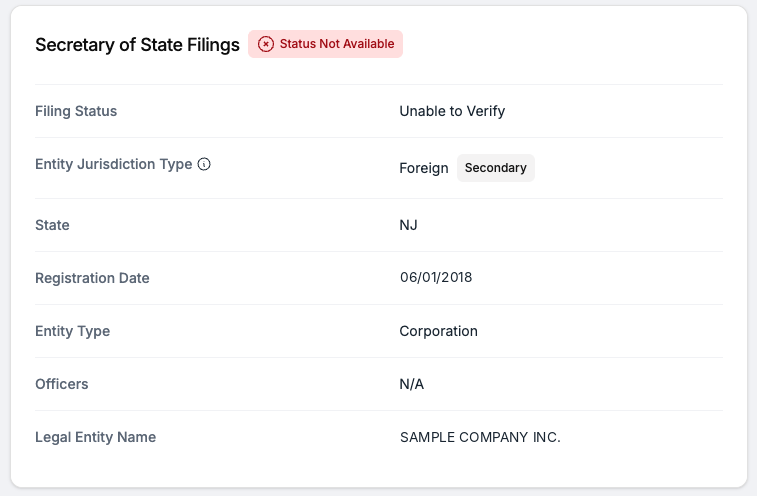
Figure 2: Secretary of State Filings in the KYB Tab for a New Jersey filing (illustrative sample)
Compliance and SecurityThe KYB verification process follows strict regulatory standards and industry-leading security protocols to safeguard sensitive data and prevent fraud.
ConclusionWorth validates business identity, registration status, leadership, and location to reduce risk and maintain regulatory compliance.
KYB Verification FAQDoes “Status Not Available” affect my Worth Score?
No. Secretary of State filing statuses do not currently impact the Worth Score.
Can “Unable to Verify” affect automated decisioning?Yes, depending on your organization’s configured decisioning rules. For example, if a rule requires an active SOS filing, a business without a confirmed active filing may not meet that requirement.
What happens if a business is registered in multiple states?Worth reviews available SOS filings across states to determine whether at least one filing is active. For example, a Delaware business with an active foreign registration in Texas may satisfy SOS active-status verification through its Texas filing.
Does “Unable to Verify” mean a business requires manual review?Not necessarily. Whether additional review is needed depends on your organization’s verification requirements and configured workflows.
How does Worth verify a business’s address?Worth verifies business addresses by cross-checking them against public and proprietary databases to confirm that the address is valid and operational.